
IP Stealth 404 List
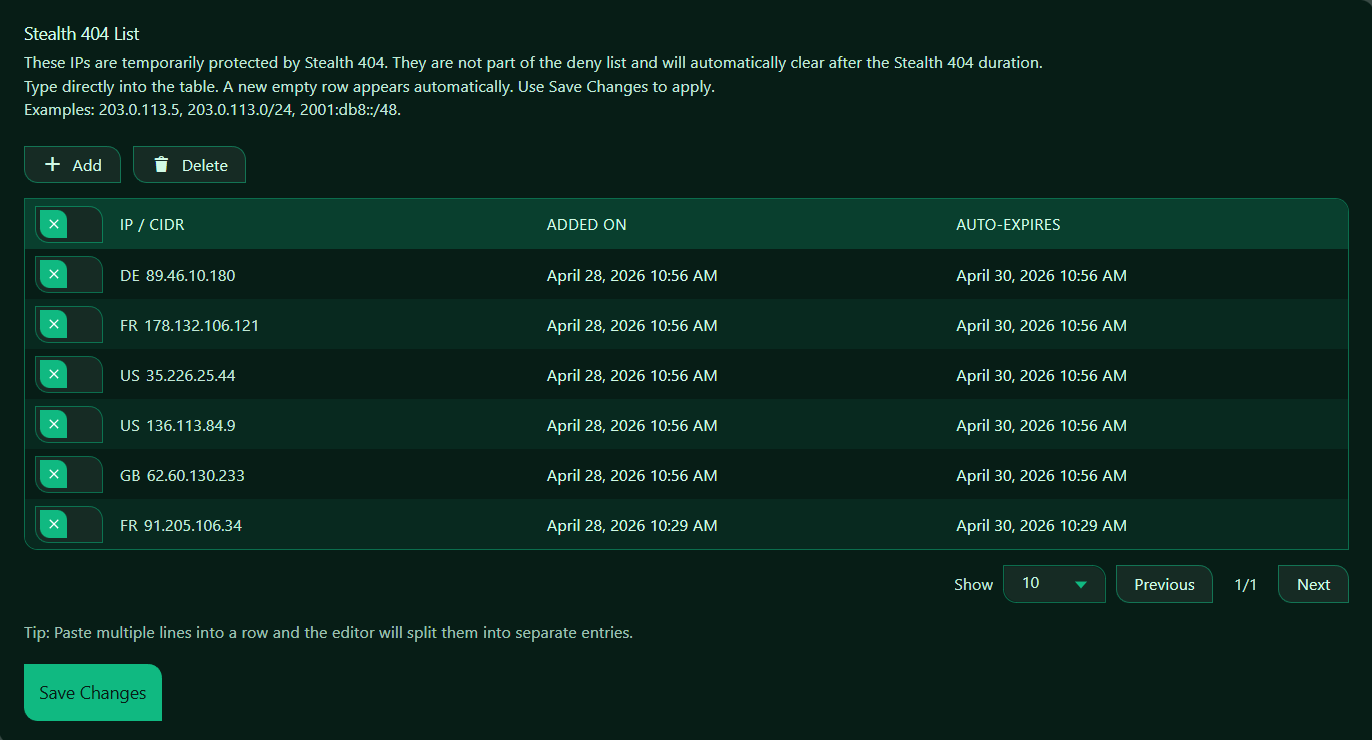
The Stealth 404 List contains IP addresses and IP ranges that are temporarily being handled by Authica’s Stealth 404 protection.
Visitors on this list are not treated like normal Deny List entries. Instead of showing a normal access-denied response, Authica can return a 404-style response so the protected area appears not to exist.
This helps reduce visibility of your login or protected endpoints and makes blocking behavior less obvious to unwanted visitors.
Important behavior:
– Stealth 404 entries are temporary
– They are separate from the Deny List
– They automatically expire after the configured Stealth 404 duration
– They can be added manually or by Authica security actions
What the Stealth 404 List Is Used For
Use the Stealth 404 List when you want certain IPs to receive a stealthier block response.
Instead of seeing a normal “forbidden” or “blocked” message, these visitors are treated as if the requested page does not exist.
This is useful for:
– Reducing visibility of protected login endpoints
– Hiding whether a login page or admin route exists
– Quietly slowing down scanners and bots
– Temporarily isolating suspicious IPs without creating permanent deny rules
How It Differs from the Deny List
The Stealth 404 List is not the same as the Deny List.
Deny List
The Deny List contains permanently or manually blocked IPs that are always denied access until removed.
Stealth 404 List
The Stealth 404 List contains temporarily protected IPs that receive a stealth-style 404 response and automatically expire after the configured duration.
Simple summary
Deny List = normal blocked access
Stealth 404 List = temporary blocked access disguised as “not found”
Supported Formats
The Stealth 404 List accepts:
– Single IPv4 addresses
– IPv4 CIDR ranges
– Single IPv6 addresses
– IPv6 CIDR ranges
Single IP Address
Use a single IP when you want only one exact address handled by Stealth 404.
Example: 203.0.113.5
CIDR Range
Use a CIDR range when you want a full subnet or network range handled by Stealth 404.
Example: 203.0.113.0/24 or 2001:db8::/48
Use ranges carefully, because wide CIDR ranges can affect many visitors at once.
Add Button
The Add button inserts a new empty row into the Stealth 404 List.
Use it when you want to manually add a new IP or CIDR range.
Use Add to manually place a suspicious or unwanted IP into temporary Stealth 404 handling.
Delete Button
The Delete button removes selected Stealth 404 rows.
Before clicking Delete, select the row or rows you want to remove.
Use this when:
– A temporary entry should be cleared early
– An IP was added by mistake
– You want to stop stealth handling before the auto-expiry time
Selection Column
The first column is used to select rows for deletion or bulk actions.
Select one or more entries, then click Delete.
If no rows are selected, Delete will usually do nothing.
IP / CIDR Column
The IP / CIDR column shows the IP addresses or ranges currently under Stealth 404 handling.
Depending on your setup, country codes may appear beside the IP for easier identification.
This column is the main value that tells Authica which IPs should receive the Stealth 404 response.
Added On Column
The Added On column shows when the Stealth 404 entry was created.
This helps you understand:
– When the IP was added
– Whether the entry is recent
– How long it has already been active
Auto-Expires Column
The Auto-Expires column shows when the Stealth 404 entry will automatically expire.
This tells you exactly when the temporary Stealth 404 protection will end for that IP.
Once that time is reached, Authica should automatically remove or stop enforcing that entry.
This is one of the key differences between the Stealth 404 List and the Deny List.
Paste Multiple Lines
This is useful if you want to add several IPs or CIDR ranges at once.
Example paste:
203.0.113.5
203.0.113.7
203.0.113.0/24
2001:db8::/48
Authica can split them into separate rows automatically.
Save Changes
After adding, editing, or deleting Stealth 404 entries, click Save Changes.
Changes are not applied until they are saved.
Recommended Usage
The Stealth 404 List is useful when you want a more discreet response than a normal deny/block page.
Good use cases include:
– Temporary handling of suspicious login attempts
– Quietly hiding protected endpoints from scanners
– Temporary stealth blocking without creating permanent Deny List rules
– Security workflows where you want blocked visitors to see “not found”
This is especially helpful for stealth/security UX, where you do not want to reveal that a protected route exists.
Best Practices
Recommended best practices:
– Use Stealth 404 for temporary or low-visibility handling
– Use the Deny List for permanent or explicit blocks
– Review entries occasionally to confirm expected behavior
– Use CIDR ranges carefully
– Let auto-expiry clear temporary entries when possible
Important Notes
Stealth 404 entries are temporary by design.
If you need a permanent block, use the Deny List instead.
If you manually add entries here, remember that they will still auto-expire according to the configured Stealth 404 duration unless your Authica logic says otherwise.
If your site is behind Cloudflare and shows country codes in the table, those country markers are for easier visibility only. The actual enforcement still depends on the IP/CIDR entry itself.