
Hardening
XML-RPC Hardening helps reduce the attack surface of your WordPress site by limiting or hiding XML-RPC functionality.
The WordPress XML-RPC endpoint is: /xmlrpc.php.
It can be abused by bots for:
– Password spraying and brute-force attempts
– Pingback abuse
– Endpoint discovery
– Amplification-style abuse
Authica provides several XML-RPC hardening options, from fully disabling the endpoint to only hiding common discovery hints.
How XML-RPC Hardening Works
Authica lets you choose how aggressively you want to reduce XML-RPC exposure.
You can:
– Disable XML-RPC completely
– Disable only XML-RPC methods that require authentication
– Disable only pingback methods
– Hide common XML-RPC discovery hints
Important priority rule:
Disable XML-RPC completely is the strongest setting.
If it is enabled, the weaker XML-RPC method settings are effectively unnecessary or ignored.
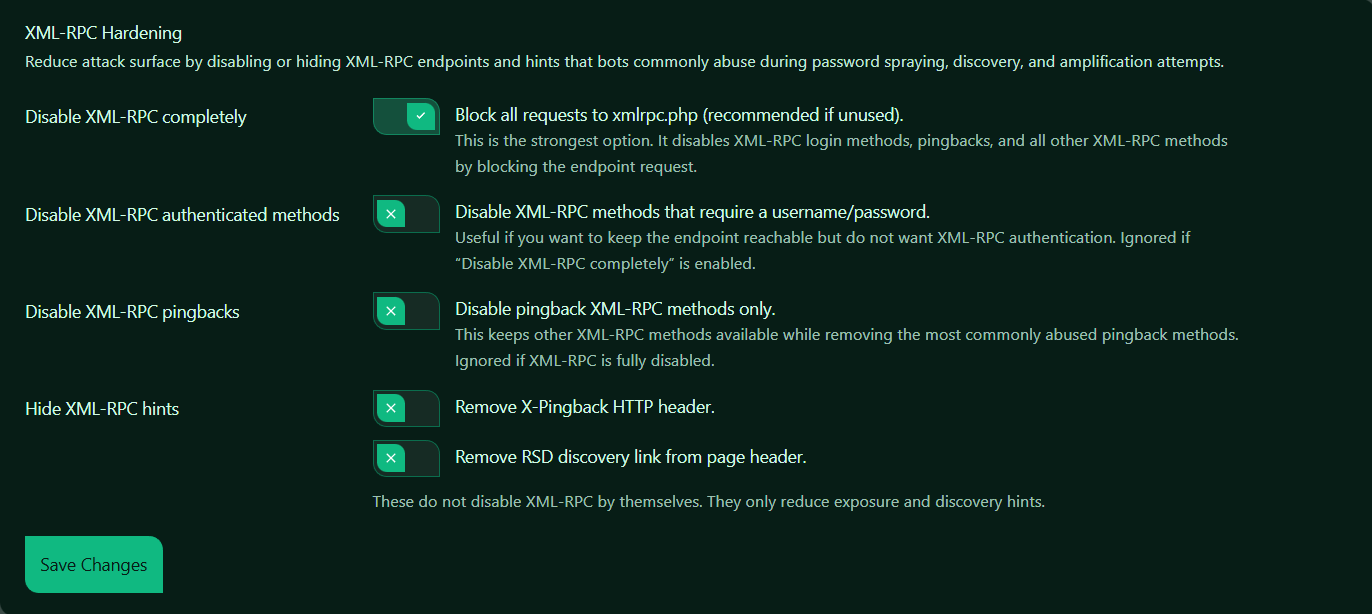
Disable XML-RPC Completely
This is the strongest XML-RPC hardening option.
When enabled, Authica blocks requests to: /xmlrpc.php.
This disables XML-RPC login methods, pingbacks, and all other XML-RPC methods by blocking access to the endpoint itself.
Recommended setting: Enabled.
This is the best option for most WordPress sites that do not actively need XML-RPC.
Use this when:
– You do not use XML-RPC-based apps or integrations
– You want the strongest protection
– You want to stop XML-RPC login abuse completely
– You do not need pingbacks
Important:
If this option is enabled, XML-RPC authenticated methods and pingback settings are effectively unnecessary because the endpoint is already blocked.
Disable XML-RPC Authenticated Methods
This setting disables XML-RPC methods that require a username and password.
These are commonly targeted in password spraying and brute-force attacks.
When enabled, Authica allows the XML-RPC endpoint to remain reachable, but blocks XML-RPC authentication methods.
Recommended usage:
Use this only if you want to keep xmlrpc.php reachable but do not want XML-RPC logins or authenticated requests.
This can be useful if:
– You need some XML-RPC behavior
– You do not want XML-RPC authentication
– You want a partial hardening approach instead of full disable
Important:
Ignored if “Disable XML-RPC completely” is enabled. So if XML-RPC is already fully disabled, this option does not add anything further.
Disable XML-RPC Pingbacks
This setting disables only XML-RPC pingback methods.
Pingbacks have historically been abused for spam and traffic amplification.
When enabled, Authica keeps other XML-RPC methods available, but removes pingback functionality.
Recommended usage:
Use this if you still need XML-RPC for some reason, but do not want WordPress pingbacks enabled.
This is useful when:
– You want to reduce XML-RPC abuse
– You do not need pingbacks
– You want lighter hardening without fully disabling XML-RPC
Important:
Ignored if XML-RPC is fully disabled. If the whole endpoint is blocked, pingbacks are already inaccessible.
Hide XML-RPC Hints
The Hide XML-RPC hints section removes common signs that XML-RPC is available.
These settings do not disable XML-RPC by themselves. They only reduce exposure and discovery hints.
This is useful when you want to make automated discovery a little harder, even if XML-RPC remains enabled.
Remove X-Pingback HTTP Header
This option removes the: X-Pingback.
HTTP header.
This header can reveal pingback-related information and indicate XML-RPC-related functionality to scanners or automated tools. Use this when you want to reduce exposure and remove an unnecessary hint from your responses.
Important:
This does not disable XML-RPC or pingbacks by itself. It only hides a discovery hint.
Remove RSD Discovery Link from Page Header
This option removes the RSD discovery link from the page header.
RSD stands for: Really Simple Discovery.
WordPress can include this link in the page head, which may help tools discover remote publishing or XML-RPC-related capabilities. Use this when you want to reduce public hints that your site supports XML-RPC-related features.
Important:
This does not disable XML-RPC by itself. It only removes a discovery hint from the page header.
Save Changes
After changing XML-RPC Hardening settings, click Save Changes.
Your changes are not applied until they are saved.
Recommended Configuration
For most websites, we recommend:
Disable XML-RPC completely: Enabled
Disable XML-RPC authenticated methods: Not needed when full disable is enabled
Disable XML-RPC pingbacks: Not needed when full disable is enabled
Remove X-Pingback HTTP header: Optional
Remove RSD discovery link from page header: Optional
This gives the strongest protection and is the simplest configuration.
For a more partial hardening setup:
Disable XML-RPC completely: Disabled
Disable XML-RPC authenticated methods: Enabled
Disable XML-RPC pingbacks: Enabled
Hide XML-RPC hints: Enabled
Use that only if you have a reason to keep XML-RPC reachable.
Best Practices
Recommended best practices:
– Fully disable XML-RPC if your site does not need it
– Disable pingbacks if you keep XML-RPC enabled
– Remove discovery hints for extra hardening
– Review old plugins or apps before keeping XML-RPC enabled
– Test external tools after changing XML-RPC settings
For most modern WordPress sites, full XML-RPC disable is the safest and cleanest choice.
Important Notes
Some older apps, remote publishing tools, or integrations may depend on XML-RPC.
Before fully disabling XML-RPC, confirm whether your site uses any tools that require:
– Remote publishing through XML-RPC
– Legacy mobile app integrations
– External systems that post through xmlrpc.php
If you do not use such tools, full disable is usually the best option.
Also remember:
Hiding XML-RPC hints does not secure the endpoint by itself. It only makes discovery less obvious.