
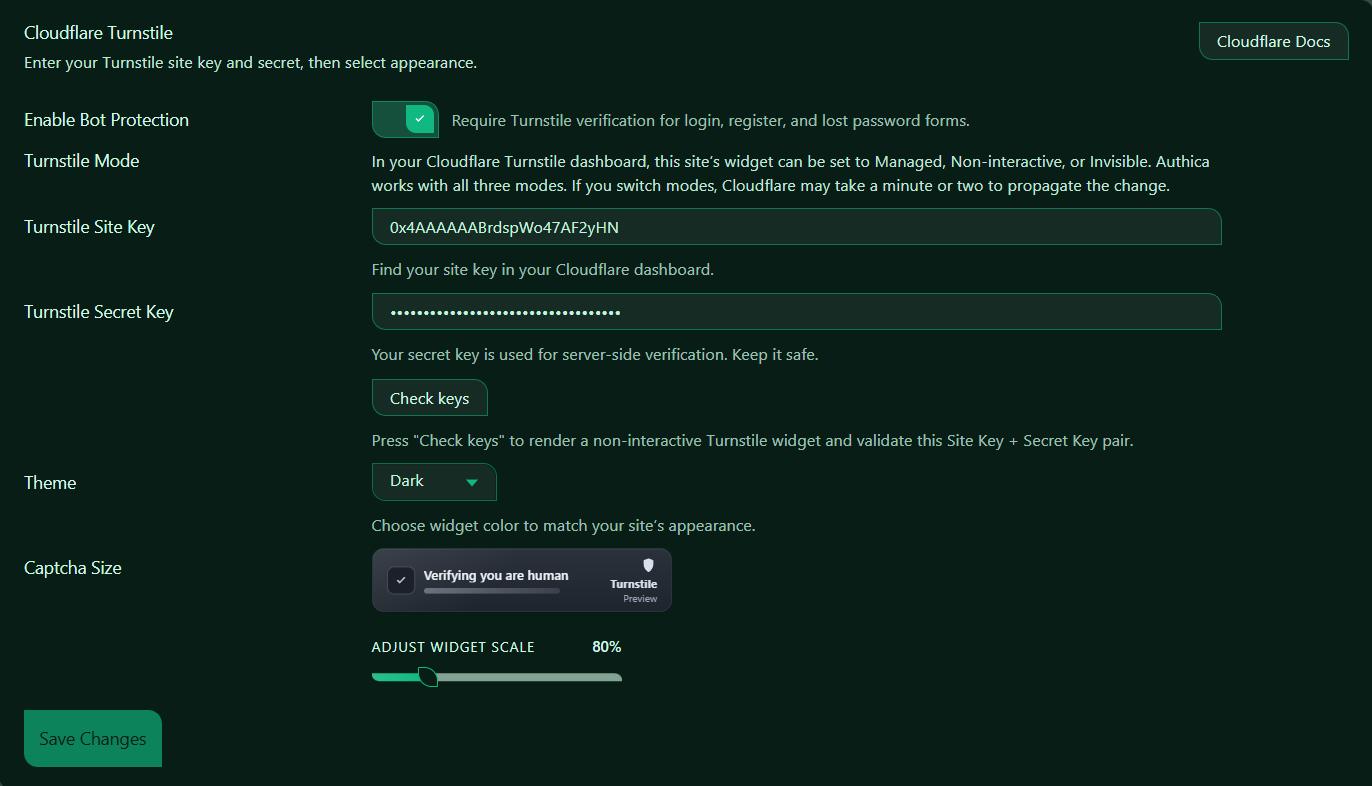
Cloudflare Turnstile
Cloudflare Turnstile adds bot protection to Authica-protected WordPress forms. When enabled, Authica can require Turnstile verification on login, registration, and lost password forms.
Turnstile helps block automated abuse without relying on traditional image-based CAPTCHA challenges.
To use this feature, create a Turnstile widget in your Cloudflare dashboard, then copy the Site Key and Secret Key into Authica.
Cloudflare Docs
The Cloudflare Docs button opens Cloudflare’s official Turnstile documentation.
Use this if you need help creating a Turnstile widget, finding your keys, or reviewing Cloudflare-specific settings.
Enable Bot Protection
This setting turns Turnstile bot protection on or off.
When enabled, Authica requires Turnstile verification on supported WordPress authentication forms, including Login Form. Registration Form and Lost Password Form.
Recommended setting is enabled.
Turnstile Mode
Turnstile Mode is configured inside your Cloudflare Turnstile dashboard.
Authica works with the available Cloudflare Turnstile modes: Managed, Non-interactive and Invisible.
Managed
Cloudflare decides whether the visitor should see an interactive challenge.
This is usually the best general-purpose option.
Non-interactive
The widget verifies visitors without requiring normal user interaction.
This can provide a smoother login experience while still checking for suspicious behavior.
Invisible
The verification runs in the background without showing a visible widget in most cases.
This provides the cleanest visual experience, but you should test it carefully on your login, registration, and lost password forms.
Turnstile Site Key
The Site Key is the public key used to display the Turnstile widget on your website.
You can find this key in your Cloudflare Turnstile dashboard. The Site Key is safe to place on the front end of your site because it is designed to be public.
Turnstile Secret Key
The Secret Key is used for server-side verification.
Authica uses this key to confirm that a Turnstile verification result is valid before allowing the protected action to continue. Keep your Secret Key private. Do not publish it, share it publicly, or place it inside visible page content.
If you believe your Secret Key was exposed, create a new key in Cloudflare and update it in Authica.
Check Keys
The Check Keys button lets you test the current Site Key and Secret Key pair.
When clicked, Authica renders a non-interactive Turnstile test and validates whether the keys can work together.
Use this button after entering or changing your keys.
A successful check means Authica can communicate with Turnstile using the provided key pair.
If the check fails, confirm that:
– The Site Key was copied correctly
– The Secret Key was copied correctly
– The keys belong to the same Turnstile widget
– The widget is configured for the correct domain
– Your site can connect to Cloudflare
Theme
The Theme setting controls the visual style of the Turnstile widget.
Available options may include light, dark, or automatic styling depending on your Authica version and Turnstile configuration.
Captcha Size
The Captcha Size setting controls the display scale of the Turnstile widget preview and login form widget.
Use this setting to make the Turnstile widget better fit your login form layout.
A smaller size can be useful for compact forms, while a larger size may be easier to see on wider layouts.
This setting changes the visual size of the widget. It does not reduce the security behavior of Turnstile.
Save Changes
After changing any Turnstile setting, click Save Changes.
Settings are not applied until they are saved.
Important Notes
Cloudflare Turnstile requires valid Turnstile keys from your Cloudflare account.
Turnstile protection can work without placing your website behind the Cloudflare proxy. However, GEO Access Control and country-code display in Authica Activity logs require your site to be behind the Cloudflare orange-cloud proxy.
For the full Authica Turnstile & Edge Security experience, use Cloudflare proxying with the orange cloud enabled.