
Redirect Rules Settings
Redirect Rules lets you control where users are sent after login and after logout.
This helps you create a smoother login experience by sending users to the right page after authentication, such as a dashboard, account page, member area, homepage, or another internal destination.
Authica supports safe redirect handling and can also respect a requested redirect_to value after login when it is valid and safe.
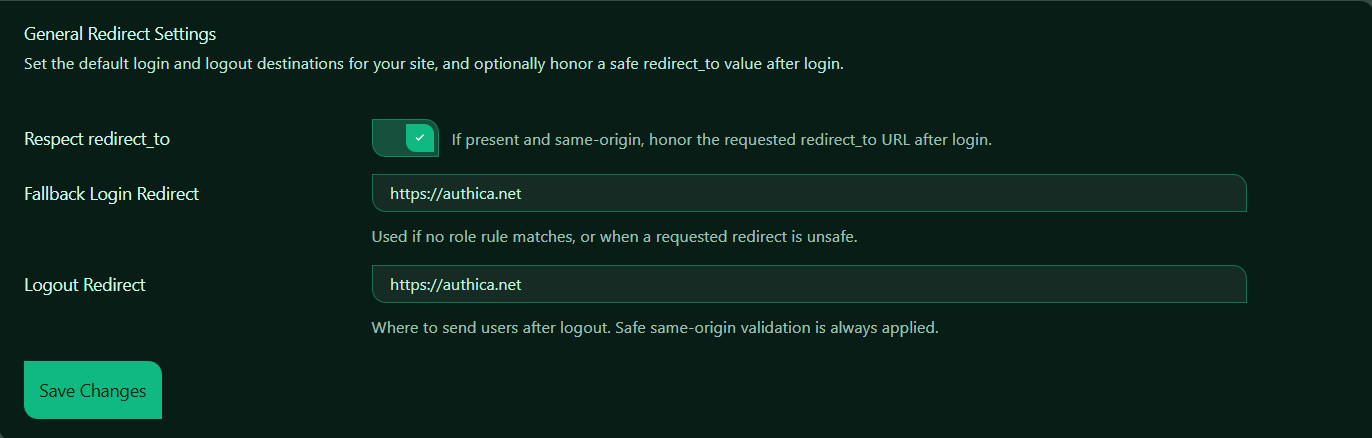
Respect redirect_to
This setting controls whether Authica should honor a redirect_to URL after login.
When enabled, Authica checks whether a redirect_to value is present and safe. If it is valid and points to the same site origin, Authica will send the user there after login.
Example: https://example.com/login/?redirect_to=https://example.com/account/
If the user logs in successfully, Authica can redirect them to: https://example.com/account/
This is useful when:
– A user tries to access a protected page before logging in
– A custom login flow sends users to a specific internal page after login
– Another plugin or part of WordPress passes a redirect_to value
Safe Redirect Behavior
Authica applies safe validation to prevent unsafe redirects.
That means Authica should only honor a redirect_to value when it is:
– Valid
– Internal / same-origin
– Safe to use
If the requested redirect is missing, invalid, or unsafe, Authica will fall back to the default login redirect instead.
Recommended setting: Enabled.
This gives a smoother user experience while still protecting against unsafe external redirects.
Fallback Login Redirect
The Fallback Login Redirect field controls where users are sent after login when no redirect rule matches or when the requested redirect_to value is unsafe or unavailable.
This means users will be redirected there after login if Authica does not have a better or safer destination to use.
Use this field for your preferred default post-login page, such as:
– Homepage
– My Account page
– Member dashboard
– Customer portal
– Welcome page
Choose a page that makes sense for most users after login.
Logout Redirect
The Logout Redirect field controls where users are sent after logging out.
This means users will be redirected there after logout.
Common choices for logout redirect include:
– Homepage
– Login page
– Goodbye page
– Public landing page
– Support page
Send users to a public page they can access without being logged in.
Authica applies safe same-origin validation here as well, which helps prevent unsafe redirect destinations.
Save Changes
After changing any redirect setting, click Save Changes.
Your changes are not applied until they are saved.
Recommended Configuration
For most websites, we recommend:
Respect redirect_to: Enabled
Fallback Login Redirect: Your homepage, dashboard, or account page
Logout Redirect: Your homepage or login page
This setup gives users a natural flow while still allowing safe redirect-based login behavior.
Example Login Flow
Here is how Redirect Rules typically work:
1. A visitor opens a protected page.
2. They are sent to the login page.
3. The protected page URL is passed as redirect_to.
4. The user logs in.
5. If redirect_to is valid and safe, Authica sends them there.
6. If not, Authica sends them to the Fallback Login Redirect.
For logout:
1. The user clicks Log Out.
2. Authica logs the user out.
3. The user is redirected to the Logout Redirect URL.
Important Notes
Redirect destinations should normally stay on your own site.
Safe same-origin validation helps protect against open redirect issues by only allowing trusted redirect destinations.
If you enter a redirect URL that is invalid or not allowed, Authica may ignore it and use a safer fallback behavior instead.