
Brute Stealth 404 Protection
Stealth 404 Protection adds an extra camouflage layer on top of Brute Force Protection.
When an IP is already blocked and continues trying to access the login page, Authica counts those blocked login hits. After the configured threshold is reached, Authica stops showing the normal login form and returns a standard 404 Not Found response to that IP for a period of time.
This helps make the login page appear as if it does not exist to aggressive or persistent attackers.
How Stealth 404 Protection Works
Stealth 404 Protection activates after an IP is already blocked.
Example:
Stealth Threshold: 3 blocked hits
Stealth 404 Duration: 48 hours
This means:
– The IP is already blocked by Brute Force Protection or the Deny List
– The same IP keeps trying to access the login page
– After 3 blocked login hits, Authica starts showing a 404 Not Found response
– The stealth 404 response remains active for 48 hours
This does not replace Brute Force Protection. It adds a stealth response after the attacker keeps probing.
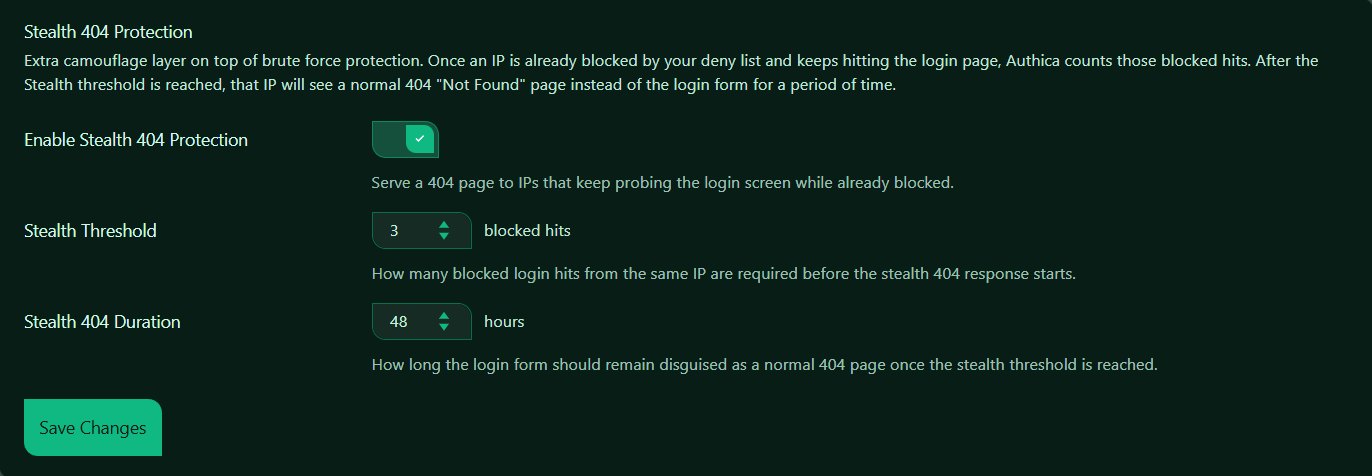
Enable Stealth 404 Protection
This setting turns Stealth 404 Protection on or off.
When enabled, Authica monitors blocked login hits from IPs that are already denied. If the same blocked IP keeps trying to reach the login form, Authica can disguise the login page as a normal 404 page.
Recommended setting: Enabled.
This is useful for reducing visibility of your login endpoint and discouraging repeated probing.
Stealth Threshold
The Stealth Threshold controls how many blocked login hits are required before Authica starts showing the 404 response.
For example, the threshold is set to: 3 blocked hits.
That means an already-blocked IP must hit the login page 3 more times before Stealth 404 starts.
Recommended values:
3 Strict and responsive
5 Balanced
10 More forgiving
A lower number activates stealth mode faster. A higher number waits longer before hiding the login page.
Stealth 404 Duration
The Stealth 404 Duration controls how long the login form remains disguised as a 404 page after the stealth threshold is reached.
For example, the duration is set to: 48 hours.
That means the blocked IP will receive the 404 response for 48 hours.
Recommended values:
24 hours Short-term stealth response
48 hours Recommended strong default
72 hours Longer stealth period
Use a longer duration if you want persistent blocked attackers to stay hidden from the login form for more time.
Save Changes
After changing Stealth 404 Protection settings, click Save Changes.
Settings are not applied until they are saved.
Recommended Configuration
For most websites, we recommend:
Enable Stealth 404 Protection: Enabled
Stealth Threshold: 3 to 5 blocked hits
Stealth 404 Duration: 24 to 48 hours
A strong default setup:
Stealth Threshold: 3
Stealth 404 Duration: 48 hours
This quickly hides the login form from IPs that are already blocked and keep trying to access it.
How It Works with Brute Force Protection
Brute Force Protection and Stealth 404 Protection work together.
Simple flow:
1. A visitor repeatedly fails login.
2. Brute Force Protection blocks the IP.
3. The IP is added to the Deny List.
4. The blocked IP keeps hitting the login page.
5. Stealth 404 Protection counts those blocked hits.
6. After the threshold is reached, Authica shows 404 Not Found to that IP.
So Brute Force Protection handles the block. Stealth 404 Protection controls the camouflage response after the block.
How It Works with the Stealth 404 List
When Stealth 404 Protection is triggered, the IP may appear in the Stealth 404 List.
The Stealth 404 List shows IPs currently receiving the temporary 404 response.
These entries are temporary and expire based on the Stealth 404 Duration setting.
Simple summary:
Deny List = IP is blocked
Stealth 404 List = blocked IP receives a temporary 404-style response
Best Practices
Recommended best practices:
– Keep Brute Force Protection enabled before using Stealth 404
– Use a low threshold for aggressive login protection
– Use 24–48 hours for a practical stealth duration
– Review the Stealth 404 List if you want to see active stealth entries
– Use the Deny List for permanent blocks
Stealth 404 is especially useful when you want blocked bots to stop seeing obvious login or security responses.
Important Notes
Stealth 404 Protection only starts after an IP is already blocked and continues hitting the login page.
It is not the first layer of protection. The first layer is Brute Force Protection, IP Restriction, or another rule that blocks the IP.
The 404 response is temporary and is designed to reduce visibility, not permanently block the IP by itself.