
WAF Exclusions
The Exclusions tab lets you tell Authica’s Web Application Firewall to ignore trusted request paths or parameter names that may contain code-like content by design.
Exclusions are useful when a trusted plugin, theme, API endpoint, or custom feature sends data that looks suspicious but is expected and safe for your site.
Use exclusions carefully. Anything excluded from WAF inspection will not be checked by Authica’s WAF rules.
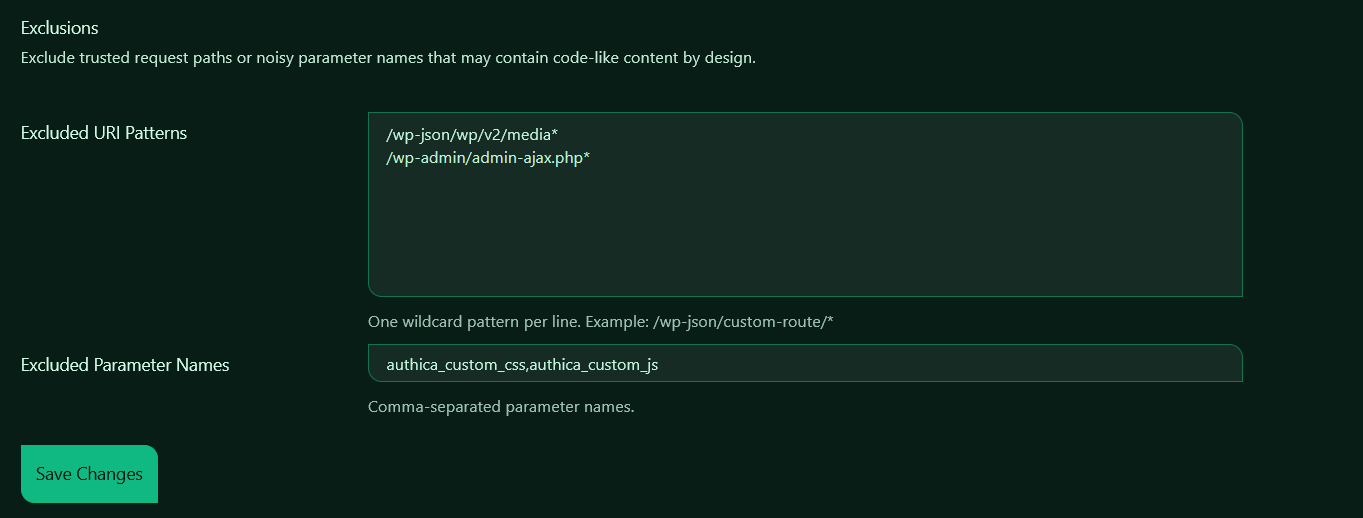
Excluded URI Patterns
The Excluded URI Patterns field lets you exclude specific request paths from WAF inspection.
Add one wildcard pattern per line.
Example:
/wp-json/custom-route/*
This means requests matching that path pattern will bypass WAF inspection.
Common use cases include:
/wp-json/wp/v2/media*
/wp-admin/admin-ajax.php*
These paths are commonly used by WordPress, plugins, themes, media uploads, frontend builders, AJAX features, and REST API requests. Some of these requests may contain complex data, encoded content, HTML fragments, JSON payloads, or other values that can look suspicious to a firewall.
Wildcard Matching
You can use * as a wildcard.
For example:
/wp-json/wp/v2/media*
matches requests beginning with:
/wp-json/wp/v2/media
This can include additional path data or query strings after that pattern.
Excluded Parameter Names
The Excluded Parameter Names field lets you exclude specific request parameters from WAF inspection.
Add parameter names as a comma-separated list.
Example:
authica_custom_css,authica_custom_js
This is useful when a trusted form or admin feature intentionally saves CSS, JavaScript, HTML, JSON, or other code-like values.
For example, a custom CSS field may naturally contain characters like: { } : ; # . /
A custom JavaScript field may contain patterns like:
<script>
function()
alert()
Without an exclusion, those values could look similar to XSS or code injection attempts. By excluding only the trusted parameter name, you can avoid false positives while keeping the rest of the request protected.
Recommended Usage
Use URI exclusions when an entire trusted route should bypass WAF inspection.
Use parameter exclusions when only one specific field is expected to contain code-like content.
Whenever possible, prefer a narrow exclusion instead of excluding a large path. For example, excluding one parameter is usually safer than excluding the full request URL.
Example Configuration
A typical configuration may look like this:
Excluded URI Patterns:
/wp-json/wp/v2/media*
/wp-admin/admin-ajax.php*
Excluded Parameter Names:
authica_custom_css,authica_custom_js
This allows trusted WordPress media/API and AJAX behavior while also preventing custom CSS and JS fields from being incorrectly flagged.
Saving Changes
After adding or removing exclusions, click Save Changes.
Changes do not apply until they are saved.
Related Settings
Firewall Rules
Choose which attack categories Authica should inspect.
Sensitivity / Mode
Adjust how strict WAF detection is and whether matches are blocked or only monitored.
Block Responses
Control what happens when a request is blocked.
Statistics
Review which WAF rules are being triggered and whether exclusions may need tuning.