
WAF Statistics
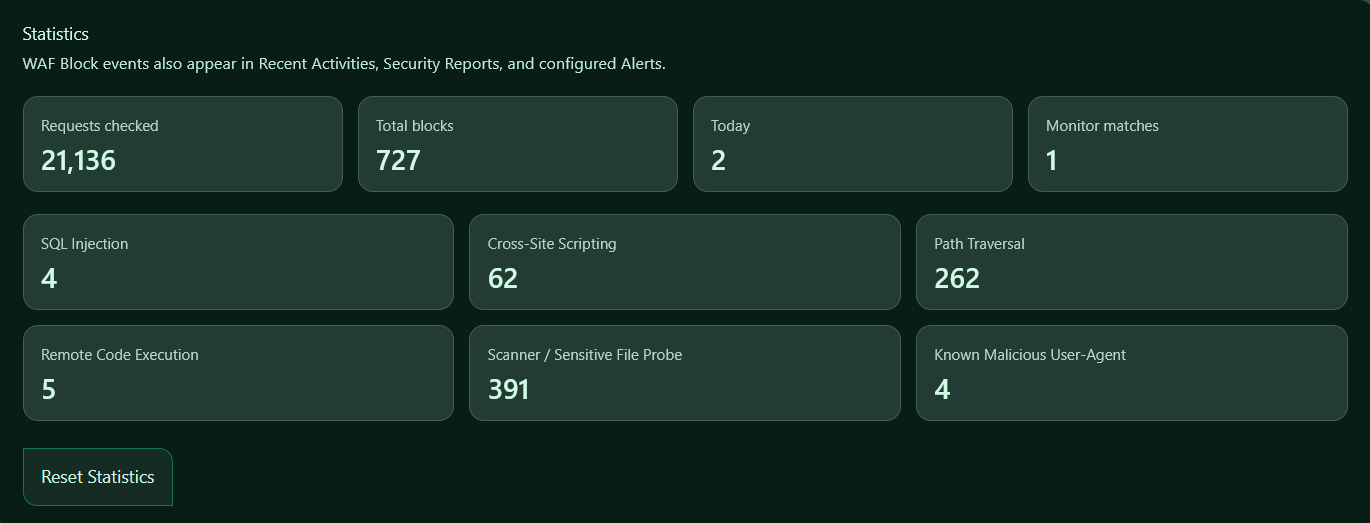
The Statistics tab shows a summary of Web Application Firewall activity on your site.
Use this page to review how many requests Authica has inspected, how many requests were blocked, how many matches happened today, and which WAF rule groups are being triggered most often.
WAF block events can also appear in:
Logging, Reports & Alerts → Activity
Logging, Reports & Alerts → Reports
Configured alert notifications
Requests Checked
The Requests checked value shows the total number of incoming requests inspected by Authica’s WAF engine.
This number increases when the WAF is enabled and Authica evaluates requests against your active firewall rules.
A high number here does not mean your site is under attack. It simply shows that the WAF is actively inspecting traffic.
Total Blocks
The Total blocks value shows the total number of requests blocked by the WAF.
This number increases when:
WAF Mode: Block
is enabled and a request matches one of the active WAF rules.
Blocked requests may also be logged in Recent Activities and, depending on your Block Responses settings, the visitor IP may be added to the IP Restriction Deny List.
Today
The Today value shows how many WAF blocks occurred during the current day.
This is useful for quickly checking whether attack activity has increased recently.
If this number suddenly jumps, review:
Logging, Reports & Alerts → Activity
WAF → Statistics
IP Restriction → Deny List
Monitor Matches
The Monitor matches value shows how many requests matched WAF rules while the firewall was running in Monitor mode.
Monitor matches are not blocked. They are recorded so you can review suspicious traffic before switching the WAF into full blocking mode.
This value is especially useful when testing new rule settings or tuning WAF sensitivity.
Rule Statistics
The rule statistic cards show how many times each WAF rule group has been triggered.
These cards help you understand what type of suspicious traffic your site receives most often.
SQL Injection
Shows how many requests matched SQL injection patterns.
These requests usually attempt to manipulate database queries through URLs, form fields, or request parameters.
Cross-Site Scripting
Shows how many requests matched XSS patterns.
These requests usually attempt to inject JavaScript, HTML, or browser-executed code into a page or request.
Path Traversal
Shows how many requests matched path traversal patterns.
These requests often try to access files outside the normal WordPress directory structure.
Remote Code Execution
Shows how many requests matched remote command or code execution patterns.
These requests may contain command separators, shell-like syntax, encoded payloads, or other execution-style strings.
Scanner / Sensitive File Probe
Shows how many requests targeted sensitive files, backup files, configuration files, debug files, or common scanner paths.
This is often one of the most active categories because many bots constantly scan WordPress sites for exposed files.
Known Malicious User-Agent
Shows how many requests matched known suspicious user-agent strings.
These are usually automated tools, scanners, bots, or clients commonly associated with probing or attack traffic.
Reset Statistics
The Reset Statistics button clears the stored WAF statistics counters.
Use this when you want to start measuring WAF activity from zero again, such as after changing WAF rules, changing sensitivity, or finishing a test period.
Resetting statistics does not disable the WAF and does not remove entries from your activity logs, reports, IP Restriction Deny List, or Stealth 404 List.
Recommended Usage
Use the Statistics tab to monitor trends over time.
For example:
Many Scanner / Sensitive File Probe hits:
Normal bot/scanner traffic. Keep the rule enabled.
Many Path Traversal or RCE hits:
Possible active probing. Review Recent Activities and consider Deny List or Stealth 404 behavior.
Many Monitor matches:
Review the logs before switching WAF Mode from Monitor to Block.
Many false positives:
Lower WAF Sensitivity or add narrow exclusions for trusted paths or parameters.
Related Settings
Firewall Rules
Controls which WAF rule categories are active.
Sensitivity / Mode
Controls whether matching requests are blocked or only monitored.
Exclusions
Allows trusted paths or parameters to bypass WAF inspection.
Block Responses
Controls HTTP status, response format, response message, and Deny List integration.
Logging, Reports & Alerts
Shows detailed WAF events, reports, and configured alert behavior.