
WAF Rules
The Firewall Rules tab controls which request-inspection rules are active in Authica’s Web Application Firewall. These rules help detect suspicious traffic before it reaches sensitive WordPress areas, login endpoints, or vulnerable request handlers.
When the WAF is enabled, Authica checks incoming requests against the selected rule groups. If a request matches an active rule, Authica handles it according to your settings in the Sensitivity / Mode and Block Responses tabs.
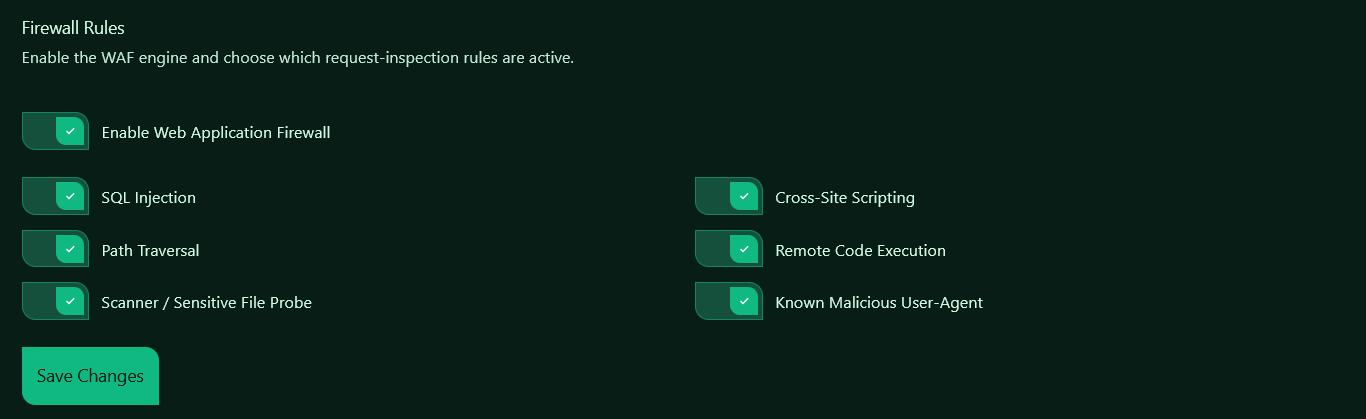
Enable Web Application Firewall
This is the main switch for the WAF engine.
When enabled, Authica starts inspecting incoming requests for common attack patterns. When disabled, all WAF rule checks are bypassed, even if individual rule categories are turned on.
Use this option when you want to quickly enable or disable the entire WAF without changing your individual rule selections.
SQL Injection
Detects request patterns commonly used in SQL injection attacks.
SQL injection attempts usually try to manipulate database queries by injecting SQL commands into URLs, form fields, or request parameters. These attacks may target login forms, search fields, plugin endpoints, or exposed query parameters.
Keep this rule enabled unless you are troubleshooting a confirmed false positive.
Cross-Site Scripting
Detects request patterns commonly used in XSS attacks.
Cross-site scripting attempts usually try to inject JavaScript or HTML into a page or request. These attacks can be used to steal sessions, manipulate page content, or abuse forms and user input fields.
This rule is recommended for almost all sites.
Path Traversal
Detects attempts to access files or directories outside the intended WordPress path.
Path traversal attacks often include patterns such as ../ or encoded directory traversal strings. Attackers use these to try to read sensitive server files or probe for insecure file handling.
This rule should normally stay enabled.
Remote Code Execution
Detects request patterns commonly associated with command execution attempts.
Remote code execution attacks try to make the server run unauthorized commands. These requests may include shell-like syntax, command separators, encoded payloads, or suspicious execution strings.
This is one of the most important WAF protections and should remain enabled.
Scanner / Sensitive File Probe
Detects automated scanners and requests for sensitive files.
This rule helps block probes for files such as backup files, configuration files, exposed environment files, debug files, and common scanner targets. Examples include requests for files like .env, old config backups, or known vulnerable paths.
This rule is useful for reducing noisy bot traffic and reconnaissance attempts.
Known Malicious User-Agent
Detects suspicious or commonly abused user-agent strings.
Many automated tools, vulnerability scanners, and attack bots identify themselves through the request user-agent header. This rule blocks or logs requests using known malicious or suspicious user-agent patterns.
This rule helps stop low-quality automated traffic before it reaches WordPress.
Saving Changes
After changing any WAF rule setting, click Save Changes.
Changes do not apply until they are saved.
Recommended Configuration
For most websites, Authica recommends enabling:
– Enable Web Application Firewall
– SQL Injection
– Cross-Site Scripting
– Path Traversal
– Remote Code Execution
– Scanner / Sensitive File Probe
– Known Malicious User-Agent
You should only disable an individual rule if you have confirmed that it is causing a compatibility issue with a trusted plugin, theme, API endpoint, or external service.
Related Settings
The Firewall Rules tab only controls which rule groups are active.
Use the other WAF tabs to control how matches are handled:
Sensitivity / Mode
Choose whether WAF matches are blocked or only monitored, and adjust detection sensitivity.
Exclusions
Allow trusted URLs, parameters, or request patterns to bypass WAF inspection.
Block Responses
Choose what visitors see when a request is blocked, including HTTP status behavior and IP deny-list integration.
Statistics
Review detected WAF activity and see which rule groups are being triggered.